How AI Suggested Messages Boost Engagement and Sales with Smart One-Tap Reply Options
- Yaheli
- Dec 3, 2025
- 4 min read
Website owners and ecommerce managers face a common challenge: keeping visitors engaged and guiding them smoothly through the buying journey without overwhelming them. Typing long responses or searching for the right question to ask next can slow down conversations and cause potential customers to lose interest. This is where AI suggested messages come in, transforming website chatbots into smart, guided assistants that reduce friction and improve engagement.
Starting after the chatbot’s second message, AI suggested replies analyze the live conversation and offer visitors one-tap replies at the bottom of the chat window. These quick options help visitors move forward with a single tap, whether they want to ask a follow-up question, see pricing, book a demo, or leave their details. This simple interaction style increases the chances of completed forms and sales conversations on both desktop and mobile devices. These suggestions are not fixed quick-reply buttons but are dynamically generated based on the actual conversation content.
Benefits of AI-Suggested Messages in Website Chatbots
Enhanced User Experience: Intuitive AI-suggested messages streamline interactions.
Reduced Typing Effort: Quick one-tap replies minimize typing.
Improved Engagement: Keeps visitors engaged and conversations ongoing.
Increased Form Completions: Simplifies interactions, boosting completion rates.
Boosted Sales Conversations: Engaging chats enhance sales across platforms.
Implementation Strategies
Analyze Live Conversations: Continuously monitor and refine messages.
Optimize for Mobile: Ensure one-tap replies work well on mobile devices.
Test and Iterate: Regularly test and improve messages based on feedback.
How AI Suggested Messages Work in Live Conversations
AI suggested messages use natural language processing to understand the flow of a chat. After the chatbot sends its second message, the system evaluates the visitor’s previous inputs and the context of the conversation. It then generates a set of relevant, concise reply options that appear as buttons or quick taps below the chat window.
These one-tap replies act as a guided path for visitors, reducing the effort needed to type out responses or figure out what to ask next. Instead of typing, visitors simply tap a suggested reply, which triggers the chatbot to respond accordingly and keep the conversation moving.
This approach creates a conversion-focused chatbot experience that feels natural and helpful. It guides visitors toward the next logical step without overwhelming them with too many choices or complex questions.
Benefits of One-Tap Replies for Ecommerce Websites
Ecommerce sites often struggle with abandoned carts and visitors who hesitate to ask questions. AI suggested messages solve this by offering quick, relevant options that encourage interaction.
For example, after a visitor asks about a product, the chatbot might show one-tap replies like:
“Show me more colors”
“What’s the price?”
“Add to cart”
“Check shipping options”
These options help visitors get answers fast and take action without typing. This reduces friction and keeps visitors engaged longer, increasing the chance they complete a purchase.
Example: A visitor browsing running shoes asks about sizes. The chatbot replies with size availability and then shows one-tap replies: “Add to cart,” “See reviews,” or “Compare with other models.” The visitor taps “Add to cart,” moving closer to checkout with minimal effort.
How AI Suggested Messages Enhance SaaS and B2B Conversations
For SaaS and B2B websites, the goal is often to book demos, provide pricing details, or collect lead information. AI suggested replies simplify these steps by offering clear, actionable options.
After the chatbot’s second message, visitors might see one-tap replies such as:
“Book a demo”
“Get pricing details”
“Talk to sales”
“Send me a brochure”
These options reduce the barrier to engagement. Visitors don’t have to type out requests or search for contact forms. Instead, they tap a button, and the chatbot handles the next step, such as scheduling a demo or sending an email.
Example: A visitor interested in a project management tool asks about features. The chatbot responds and then offers one-tap replies: “Book a demo,” “See pricing,” or “Download brochure.” The visitor taps “Book a demo,” triggering the chatbot to schedule a call, increasing lead conversion rates (works using AI lead capture).
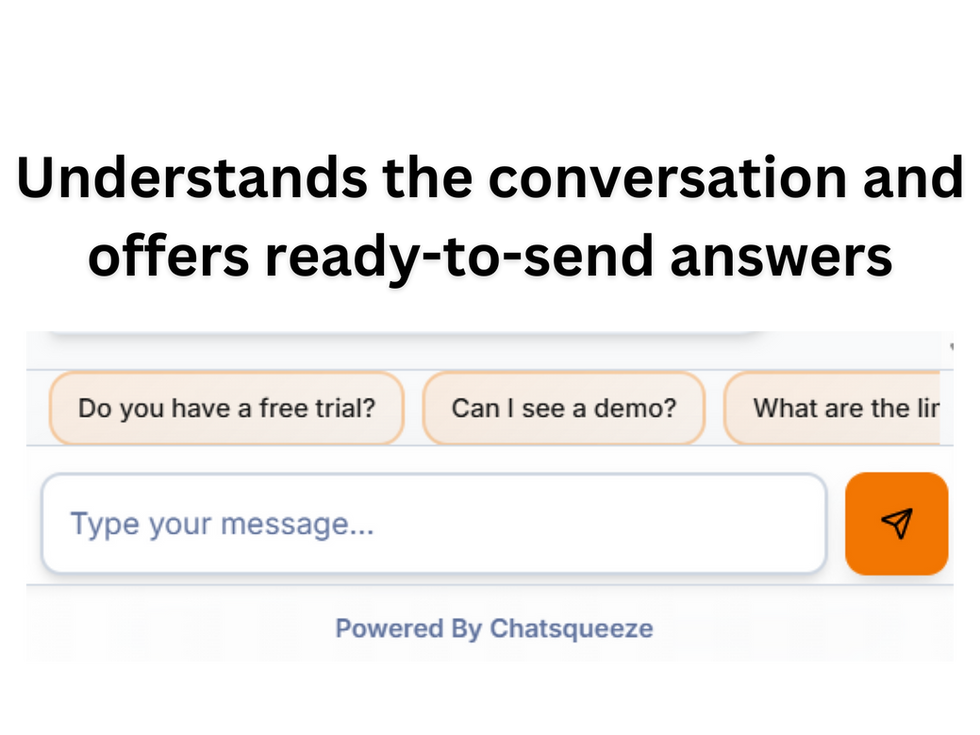
AI suggested messages appear as one-tap reply buttons below the chatbot conversation, guiding visitors through the next steps.
Why Reducing Typing Effort Matters for Engagement
Typing on desktop or mobile can be a barrier for many visitors. Mobile users especially benefit from one-tap replies because typing on small screens is slower and more error-prone. By offering AI suggested messages, chatbots reduce this friction and make it easier for visitors to interact.
Visitors who can respond quickly are more likely to stay engaged and complete desired actions. This leads to:
Higher form completion rates
More demo bookings or sales conversations
Increased overall engagement on the website
The guided chatbot experience feels smoother and less frustrating, encouraging visitors to explore more and take action.
The Impact on Engagement and Sales
AI suggested messages transform website chatbots into smart, user-friendly guides. By analyzing live conversations and offering one-tap replies after the bot’s second message, they reduce typing effort and keep visitors moving forward with ease. This approach improves engagement, increases completed forms, and drives more sales conversations on both desktop and mobile.