Why Your SaaS Onboarding is Broken: Stop Forcing Users to Read Manuals
- Yaheli
- Dec 10, 2025
- 7 min read
Quick Summary: Key Questions Answered
What is an embedded AI Copilot for SaaS? An embedded AI Copilot is a context-aware assistant integrated directly into your SaaS dashboard. Unlike standard chatbots, it uses Retrieval-Augmented Generation (RAG) to scan your existing documentation (PDFs, docs) and provide instant, accurate answers to user queries, reducing the need for human support.
How does AI automation reduce SaaS churn? AI automation reduces churn by eliminating user friction during onboarding. When users get instant answers to technical questions without leaving the app or waiting for a support ticket, they achieve "time-to-value" faster. Lower frustration levels directly correlate with higher retention rates for software platforms.
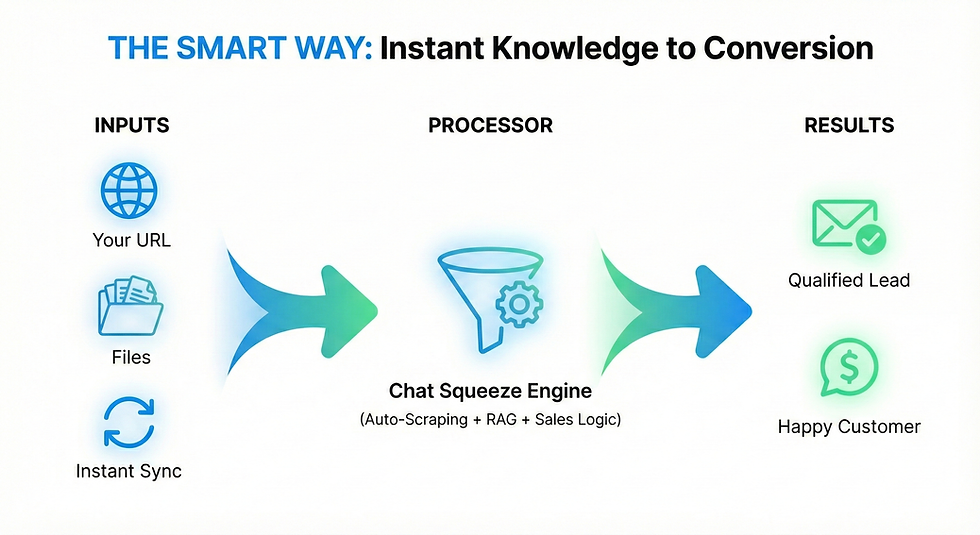
Can I turn my PDF documentation into a chatbot? Yes. Tools like Chat Squeeze allow you to upload static PDF, Word, or text files directly to the system. The AI indexes this content and transforms it into a conversational interface instantly. This allows you to update your support bot simply by uploading a new version of your documentation file, with no coding required.

It happens every day. You are deep in the zone, finally cracking that complex piece of logic you have been working on for a week. The music is on, the coffee is working, and the code is flowing.
Then you hear it. The notification sound.
A new support ticket just landed. You alt-tab over, expecting a critical bug or a server outage. Instead, you see this: "Hi, how do I change my password?" Or maybe: "Where can I find my monthly invoice?"
Your heart sinks. You don't hate your users, but you definitely hate that question. Why? Because the answer is right there. It is in the onboarding email. It is in the FAQ section. It is literally a button on their dashboard.
You spent weeks writing beautiful documentation using Notion or GitBook. You took screenshots. You wrote step-by-step guides. Yet, here you are, manually typing out an answer that already exists, while your code gets cold.
This is the great paradox of the SaaS world in 2025. We have better tools for writing documentation than ever before, but users are reading less than ever before.
The hard truth is that the traditional "Knowledge Base" is dying. Users do not want to read manuals. They want results. In this post, we are going to explore why this happens and how you can fix it by turning your static files into an active AI Copilot.
The Psychology of the "Lazy" User
Before we talk about the solution, we have to respect the problem. It is easy to call users lazy, but that is not accurate. They are not lazy; they are overwhelmed.
When someone logs into your SaaS, they have a specific goal. They want to send a newsletter, analyze a dataset, or manage a project. They are focused on that outcome.
When they hit a roadblock, they have to make a choice. Option A is to stop what they are doing, open a new tab, find your Help Center, search for a keyword, scroll through a long article, and try to find the relevant paragraph. Option B is to send a message and hope someone else solves it for them.
Option A requires a high cognitive load. It forces the user to switch context. In the fast-paced world of software, friction equals churn. If a user cannot figure out how to do something in 30 seconds, they assume the product is "hard to use." They do not blame their lack of reading; they blame your UX.
Static documentation is a passive solution to an active problem. You are expecting the user to come to the information. The future of onboarding is bringing the information to the user, right inside the app, the moment they need it.
Enter the AI Copilot (It is Not Just a Chatbot)
When I say "chatbot," you probably cringe. You are imagining those terrible, script-based bots from five years ago. The ones that force you to choose from a menu of irrelevant options and eventually tell you to "please wait for an agent."
That is not what we are building here.
We are talking about a context-aware AI Copilot. Imagine if you could hire a support agent who has memorized every single PDF, Word doc, and technical guide you have ever written. This agent never sleeps, replies in under two seconds, and never gets passive-aggressive when answering the same question for the 500th time.
This is now possible for solo founders and small teams. It works through a concept called RAG, or Retrieval-Augmented Generation.
You don't need to train a massive AI model from scratch. You don't need a team of data scientists. With tools like Chat Squeeze, you simply take the assets you already have—your PDF guides, your text files, your feature lists—and you upload them.
The system indexes this information. When a user asks a question, the AI searches your specific files, finds the exact answer, and generates a natural, human-like response. It is not guessing. It is reciting your own documentation back to the user, but in a conversational way.
From Static Files to Instant Answers
Let’s look at how this changes your workflow. You probably have a folder somewhere full of Google Docs or PDFs that explain your features. Currently, those files are gathering dust.
1. The PDF Transformation
Let’s say you have a 20-page PDF explaining your API integration. It is comprehensive, but it is dense. A developer using your SaaS hits a snag. instead of wading through the PDF, they open the Chat Squeeze widget and ask: "What is the correct endpoint for user creation?" The AI scans the PDF, extracts the specific code snippet, and presents it. The user is happy. You didn't have to get involved.
2. The Onboarding Assistant
Onboarding is where you lose the most users. They sign up, look around, get confused, and leave. Instead of forcing them to watch a generic "Welcome Video," imagine an embedded assistant. The user asks: "I want to set up my first campaign. Where do I start?" The Copilot replies: "Welcome! To start a campaign, go to the 'Marketing' tab on the left and click 'New'. Would you like me to explain the settings?" It holds their hand through the process using the logic you already wrote in your guides.
The Mobile Nightmare: Why Most Widgets Fail
There is one massive problem with most chat widgets on the market today. They ruin your mobile experience.
As a SaaS founder, you know the pain. You design a clean, responsive mobile interface. Then you install a chat widget from a big company like Intercom or Drift. Suddenly, a giant bubble appears in the bottom right corner.
It covers your "Save" button. It covers your navigation. It is intrusive.
When building Chat Squeeze, this was a priority. We realized that a support tool shouldn't break the product it is supposed to support. A good AI Copilot needs to be unobtrusive. It should be "tucked away" until the user specifically asks for help. It shouldn't scream for attention or block critical UI elements. This is especially true for SaaS platforms that are increasingly being managed from phones. If your user can't click "Submit" because the chat bubble is in the way, you have just lost a customer.
The ROI of Automating Yourself
Let’s talk about money. As a founder, your time is your most expensive asset.
If you value your time at even $50 an hour, every 10 minutes you spend answering a basic support ticket costs you $8.30. That might not sound like much. But add it up. If you get 5 tickets a day, that is over $1,200 a month in lost time.
But the real cost isn't the money. It is the context switching. It takes about 23 minutes to get back into a state of deep focus after an interruption. Every time you stop coding to reply to an email, you are losing massive amounts of productivity.
By uploading your docs to an AI system, you are effectively cloning yourself. You are automating the "Tier 1" support - the basic, repetitive questions. This filters out 80% of the noise. This means that when a ticket does reach your inbox, it is actually important. It is a real bug, a billing issue, or a high-value sales inquiry. You go from being a support rep to being a problem solver.
The Risks: Garbage In, Garbage Out
I promised to be honest, so here is the catch. AI is not magic. It is a mirror.
If your documentation is outdated, the AI’s answers will be outdated. If you upload a file from 2023 that says a feature costs $10, but you raised the price to $20 yesterday, the bot will give the user the wrong price.
This creates a new responsibility for you. You must keep your source files clean. The good news is that updating a file is much faster than retraining a human employee. With Chat Squeeze, if you change a feature, you just delete the old file and upload the new one. The AI "learns" the update instantly.
You cannot just set it and forget it forever. You need to treat your documentation as the source of truth. If the source is corrupted, the output is corrupted.
Conclusion: The Unfair Advantage
The market is crowded. Your competitors are likely still using static FAQs or slow, human-based support. Offering instant, accurate, 24/7 answers inside your app is an unfair advantage. It makes your product feel smarter, faster, and more professional.
Your users do not want to talk to you. They want to finish their work and go home. Give them the tool to do that.
Stop forcing your users to do homework. Take your existing PDFs, Docs, and text files, and turn them into a Copilot.
Ready to stop answering the same questions every day? Upload your first document to Chat Squeeze and see it in action. You can get started for free and let the AI handle the first 100 messages on the house.